

PowerShell 7.6 release postmortem and investments
The PowerShell team published a candid postmortem on why 7.6 shipped later than planned, and it is worth a read if you were wondering what happened. The short version is that a compliance requirement introduced late in the cycle forced a complete replacement of the packaging toolchain for non Windows platforms from scratch, which cascaded into validation delays across multiple platforms and architectures, a holiday freeze that blocked publishing to PMC, and coordination gaps that made it hard to track risk and escalate early. To their credit the team is not just explaining what went wrong but has already started fixing it, with explicit release ownership, structured tracking, a more consistent preview cadence, and a commitment to communicate timeline risks to the community earlier through the PowerShell repository discussions.
https://devblogs.microsoft.com/powershell/powershell-7-6-release-postmortem/
Poking Around Until Something Breaks (And reporting it to MS) PowerShell Podcast E220 Morten Mynster
Andrew Plaw sat down with returning guest Morton Minster for a genuinely fun conversation about a year of remarkable growth that took Morton from publishing his first PowerShell module to landing a cybersecurity consultant role at a new firm, all without ever sending out a resume. Morton walks through his three public modules including the standout least privilege MS Graph tool that audits app registrations and service principals for over-permissioned Graph access, and he shares the story of discovering a security vulnerability in the Microsoft email developer dashboard where publicly registered adaptive card providers were inadvertently exposing target URLs including logic app signature keys to anyone with a tenant. Microsoft fixed it just before Christmas. The broader conversation covers APIs, the value of learning in public, the honest tradeoffs of leaning too hard on AI before you have a real foundation, and the very memorable term “slop cannon” to describe what happens when someone without that foundation starts generating code they cannot read or debug.
Bulk Convert External Users to Internal Users Using PowerShell
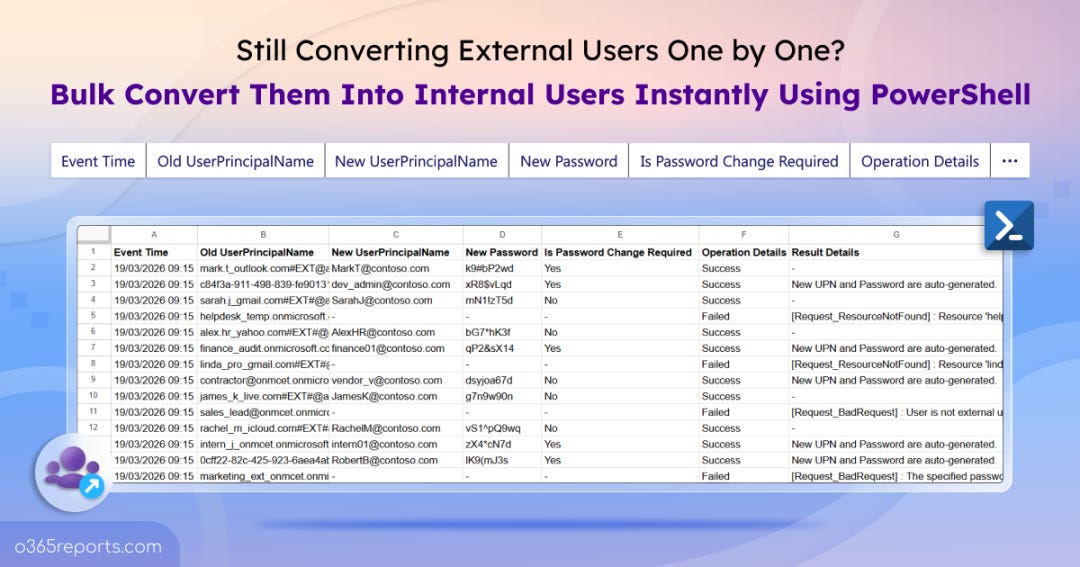
The AdminDroid blog has a practical walkthrough for something that comes up more than you might expect: converting guest users in Microsoft Entra ID into full internal users without deleting and recreating accounts. The native Entra portal supports this but only one user at a time, so they built a PowerShell script that handles bulk conversions via CSV, auto-generates UPNs and passwords at scale, and exports a password-protected log file for auditing. Group memberships, permissions, and activity history all survive the conversion intact, which is the whole point, though they do note a few things to watch for afterward like dynamic group membership changes and profile attributes that may still reflect the old guest account values.
https://o365reports.com/convert-external-users-to-internal-users-in-bulk-using-powershell/
Harm Veenstra’s MVP Summit Breakdown

Harm Veenstra has a fun recap of his second MVP Summit in Redmond, and it is the kind of post that makes you wish you were there (which I was, but didn’t do this great of a recap haha). The week was packed with NDA sessions on the Microsoft campus, a tour of the Microsoft Studios, a visit to the Xbox Studio including a genuinely impressive silent room, a PowerShell Ask Me Anything session, and a closing keynote from Mark Russinovich. Harm also attended the Northwest System Center User Group event on Friday just down the road, caught sessions on OSDCloud, PowerShell, and Intune, and wrapped up with a community dinner. Thde highlight of the whole trip might be that he is now the proud new keeper of a 3D printed Clippy chain that Dan Rey has been passing around the community.
https://powershellisfun.com/2026/03/23/mvp-summit-2026/
Your MS Graph App Has Too Much Access. Let’s Fix It with PowerShell
Morton Minster joined PowerShell Wednesday to do a live walkthrough of his Least Privilege MS Graph module, which audits all the app registrations, managed identities, and service principals in your tenant and compares the permissions they actually used against the permissions they have assigned. The setup involves enabling Microsoft Graph activity logs, routing them to a Log Analytics workspace, and giving the module read access to both, after which a single command produces an HTML report showing excessive permissions, optimal permission recommendations, throttling stats, and a list of apps with zero activity over your chosen timeframe. That last category is where the easy wins live since Morton’s sample report showed over 1,300 out of 1,600 apps with no activity at all, which is a significant attack surface most people have no visibility into. There is also a GitHub Actions workflow included so you can run the scan on a schedule and track changes over time without thinking about it.
How to Report Entra ID Group Insights
Tony Redmond takes a look at Entra ID Group Insights, a new preview feature that quietly appeared in the Entra admin center in early February without any formal announcement or documentation. The feature surfaces things like groups without owners, expired groups, and missing sensitivity labels, which are all useful but nothing you could not already find with a few lines of PowerShell. Tony’s main gripe is that the current output displays GUIDs instead of group names, which is not exactly human friendly. The more interesting part of the post is that he figured out the underlying Graph endpoint powering the feature and wrote a script that pulls the same data, resolves the GUIDs to actual group names, adds owner information, and produces a proper HTML and CSV report. The script is available in the Office 365 for IT Pros GitHub repository if you want to build on it.
https://office365itpros.com/2026/03/31/entra-id-group-insights/
PowerShell in 100 Sekunden
Andreas Dieckmann, has a great new video - here is his description from LinkedIn:
Hey folks, I created a "PowerShell in 100 Seconds" video as a short introduction to PowerShell. For most members of this group, it won't contain much news, but still might be interesting or entertaining. Or maybe something so share with someone where you want to spark some interest about PowerShell :)
The video has two real audio tracks (both actually spoken by me), no YouTube Auto-Dubs nor AI generated. You can choose between German or English in the YouTube player settings.
Pretty PowerShell Presentation
Jeff Hicks spent this issue of Behind the PowerShell Pipeline exploring how to make JSON output actually readable in the console using the pwshSpectreConsole module. The star of the show is Format-SpectreJson, which takes plain monochromatic JSON output and renders it with syntax highlighting, customizable colors for every element type from braces to member names to numbers, and even italic styling if you want it. Jeff goes a step further by wrapping the output in a Format-SpectrePanel to give it a titled border, and from there he starts building his own Show-JsonFile tooling that adds line numbers on top of everything else. If you are not already running pwshSpectreConsole, this is another good reason to install it.
https://buttondown.com/behind-the-powershell-pipeline/archive/pretty-powershell-presentation/
Upcoming Events
PowerShell + DevOps Global Summit 2026 April 13-17, 2026 in Bellevue, WA - The premier PowerShell community event returns this spring!
https://www.powershellsummit.org/
PSConfEU 2026 June 1-4, 2026 in Wiesbaden, Germany
https://psconf.eu/