

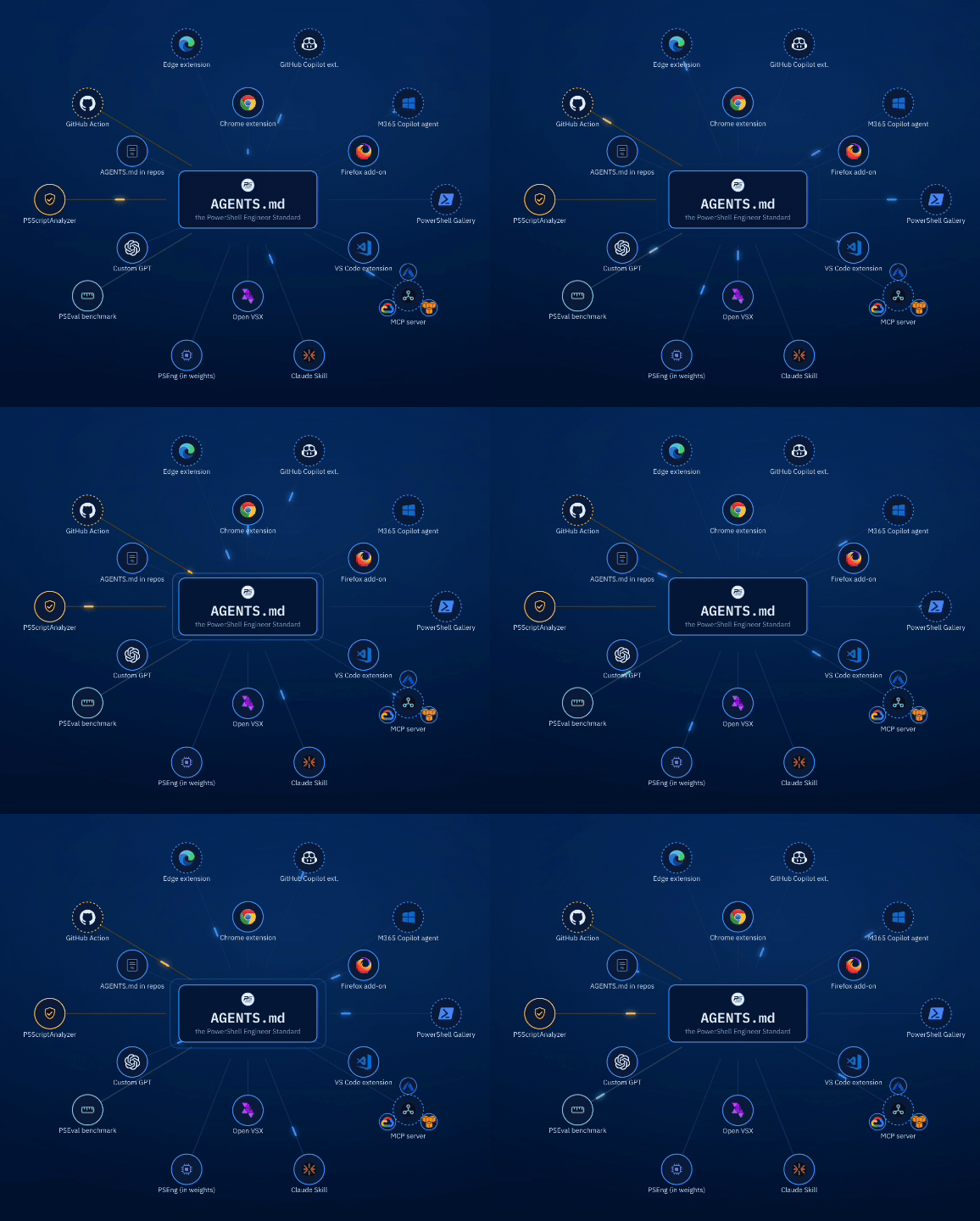
Ask any AI assistant for a script that disables stale Active Directory accounts. You’ll get something that looks right. Comment-based help, a param() block, maybe even a -WhatIf. It reads like code a competent engineer wrote.
Then you run it, and it dies on Get-ADUser -IncludeDisabled, because there is no such parameter and there never was.
That’s the defect that matters, and it isn’t a style problem. Ugly code announces itself. An invented parameter reads perfectly, survives review, and fails at 2am in front of the person who inherited your script. It’s worse than bad code because nothing about it looks wrong.
I’ve been collecting these for a while. New-ScheduledTaskTrigger -StartBoundary, -StartDate, -Monthly: an entire coherent family of parameters that do not exist, invented by a model that had clearly absorbed the shape of what scheduled-task parameters look like. Add-DnsServerRecursionScope -Forwarders, where the real parameter is -Forwarder, singular. Get-GPO -Identity, twelve times, where the real ones are -Name, -Guid, and -All.
Check out the video demo of some of these tools here:
The drive back from the Ozarks
The idea showed up on a highway last month.
We were driving back from the Ozarks, my wife and daughter and son in the car, crossing rural Missouri and then rural Illinois on the way to Springfield. There’s a long stretch of that drive where there’s nothing to do but think, and what I kept turning over was the list. Not a list of things AI gets wrong, exactly. A list of things I’d want in writing before I let any assistant, or any junior engineer, hand me a script I was going to run against production. Like, a PowerShell list that’s similar to what I do with my TeacherMagic tool.
Not style preferences. The non-negotiables. The things that, if they’re missing, I don’t care how clean the formatting is.
By the time we hit the hotel I had most of it in my head. My wife and daughter went down to the pool. I sat in the room with my son while he played Fortnite, opened the laptop, and wrote the first version of what became AGENTS.md. Then, because a standard nobody applies is just a blog post, I built the first working demo of the Chrome extension in the same sitting.
That was the whole origin. A drive, a hotel room, and a kid with a headset on.
The research says it’s not just me
A study by Zhang et al. (arXiv:2601.06419) found that more than 60% of PowerShell generated by GPT-4o and o3-mini is insecure without structured guidance, and that two thirds of GPT-4o’s PowerShell violates a PSScriptAnalyzer rule.
The number I keep coming back to is this one: GPT-4o scores 3% at noticing when a function that changes system state is missing ShouldProcess.
Models are reasonable judges of what’s present. They’re close to blind about what’s absent. A linter can only find what’s there. Something else has to say what should have been.
The non-negotiables
The PowerShell Engineer Standard is a single markdown file. Twenty-one sections, about 1,100 lines: naming, parameters and validation, splatting, pipeline output, error handling, ShouldProcess, help quality, Pester v5, module structure, performance, security, cross-platform, classes, accessibility, localization, style, GUIs, prose voice, and file formats.
Section 0 is the part I wrote first, on the drive. Thirteen items. Every function has to satisfy all of them, and if it can’t, the model is supposed to stop and say so rather than ship something that looks finished.
Here they are, one at a time. Each of these gets its own deep dive later, as will every other section of the Standard. This is the tour, not the manual.
Advanced function: [CmdletBinding()] plus a param() block. Without it you don’t get -Verbose, -ErrorAction, or any of the other common parameters — and without SupportsShouldProcess on top of it, no -WhatIf. A script that skips this isn’t a command, it’s a text file that runs.
Approved verb, singular noun, prefix applied in module context. Get-Verb is the whole list. Singular nouns because Get-PSEUsers implies it can’t return one. The prefix is what keeps your Get-Config from colliding with everyone else’s.
[OutputType()] declared. It costs one line and it’s the cheapest way to tell tooling, and the next reader, what comes out without executing anything.
Emits objects, never formatted strings. A [pscustomobject] or a class. The moment a function returns pretty text, it stops being composable and the next person has to parse your output back into data.
Validation expressed as parameter attributes, not if blocks. [ValidateSet] gets you tab completion and accepted values in Get-Help for free; [ValidateRange] and [ValidateScript] at least put the constraint somewhere discoverable. Bury it in an if and nobody finds it until it throws.
Comment-based help with a runnable .EXAMPLE. Runnable meaning copy, paste, press enter, no edits. If the example needs fixing before it works, it’s decoration.
SupportsShouldProcess on anything that changes state. This is the one models are worst at, because supplying it means noticing that something required is absent rather than that something present is wrong. Declare it, gate the mutation only, and -WhatIf becomes an audit of the run instead of a promise you made in the help text.
Terminating errors are catchable, non-terminating errors don’t masquerade as success. If you have to catch it, pass -ErrorAction Stop on that call. catch { } with nothing in it is a defect, not a style choice.
No secret reaches an output stream, a native-command argument, or source control. Module logging records bound parameter values and transcription captures the verbose stream, so Write-Verbose "pass: $plain" writes the password to the log on every endpoint that runs it. Native command arguments are visible in the process table — to any local user on Linux and macOS, and to anyone with sufficient rights to query Win32_Process on Windows.
PSScriptAnalyzer clean against the project settings file. Not “clean-ish.” Not “warnings suppressed.” Clean, or suppressed with an inline comment saying why.
Comments and help written in the voice of section 19, not in marketing register. No “leverage.” No “robust.” No “In today’s fast-paced world.” Prose ships with the module and it’s where generated work gives itself away fastest.
No invented cmdlets, parameters, modules, or properties. Section 0.1, and the reason the whole document exists. More on this in a second.
Full cmdlet names and named parameters. No aliases, no positional arguments. Where-Object, not ?. You wrote it once and someone will read it fifty times at three in the morning.
Section 0.1 does the real work
The one that earns its place is Do not invent API surface.
It doesn’t ask a model to guess better. Guessing better isn’t a thing you can instruct. It asks the model to say when it’s unsure, in the code, where you’ll actually see it:
# VERIFY: confirm -IncludeDisabled exists in your module version
Get-Command Get-ADUser -Syntax
(Get-Command Get-ADUser).Parameters.Keys
The same rule covers .NET surface, which gets invented just as often and checked far less. A constructor overload that was never there, a static method that sounds right, an enum value that fits the pattern. All of it reads fine and throws on the first run.
Stating uncertainty costs you five seconds. An invented parameter costs you a debugging session, and costs the model your trust in everything else in the file.
None of this is a new opinion, and the Lineage section says so outright. Roughly a third of the document is already mechanically enforced by rules shipping in PSScriptAnalyzer. Most of sections 2 through 7 come from Microsoft’s own cmdlet development guidelines. PoshCode’s Practice and Style guide got there first on formatting. The parts that are genuinely new, security and accessibility and localization and writing for generation rather than for reading, are named explicitly, with a note that this is where to aim criticism.
The whole thing is MIT. Take it, fork it, bend it to your house rules.
Start here: drop AGENTS.md in the repo
If you take one thing from this article, take this one, because it’s free and it’s permanent.
AGENTS.md is the emerging convention for repo-level agent instructions, and it’s the delivery channel with the least friction by a wide margin. You put the file in the root of your repository. That’s the install.
From then on, most agents that read repository context pick it up: Codex, Cursor, Copilot’s agent mode, and a growing list of others. There’s no extension to install, no API key, no per-request token cost you’re paying out of pocket, and nothing for your teammates to configure. They clone the repo and the standard comes with it.
Claude Code is the exception worth knowing about. It reads CLAUDE.md and ignores AGENTS.md entirely. No warning, no error. It just runs with no project instructions and you wonder why the output got worse. Don’t rename the file, or you’ve solved it for Claude Code and broken it for everything else. Add a CLAUDE.md alongside it that pulls the real file in: @AGENTS.md on a single line, or ln -s AGENTS.md CLAUDE.md if your team is fine with symlinks in git. One source of truth, two filenames.
That last part is the reason I’d start here even if you plan to use everything else. A standard that lives in one engineer’s browser extension is that engineer’s preference. A standard that lives in the repo is the project’s, and every agent that touches the project is conformant by default.
The /adopt command writes the whole set for you: AGENTS.md, the CLAUDE.md shim, Copilot instructions, Cursor rules, PSScriptAnalyzerSettings.psd1, and a CI workflow. Or you can copy the one file by hand and be done in ten seconds.
The Chrome extension
This was the second thing built in that hotel room.
It’s a side panel that sits next to ChatGPT, Claude, Gemini, or Copilot in the browser. You describe what you want. It builds the prompt, carrying the relevant slices of the Standard, and hands it to whichever assistant you’re already paying for. No new subscription, no API key, no data going anywhere except to the assistant you chose.
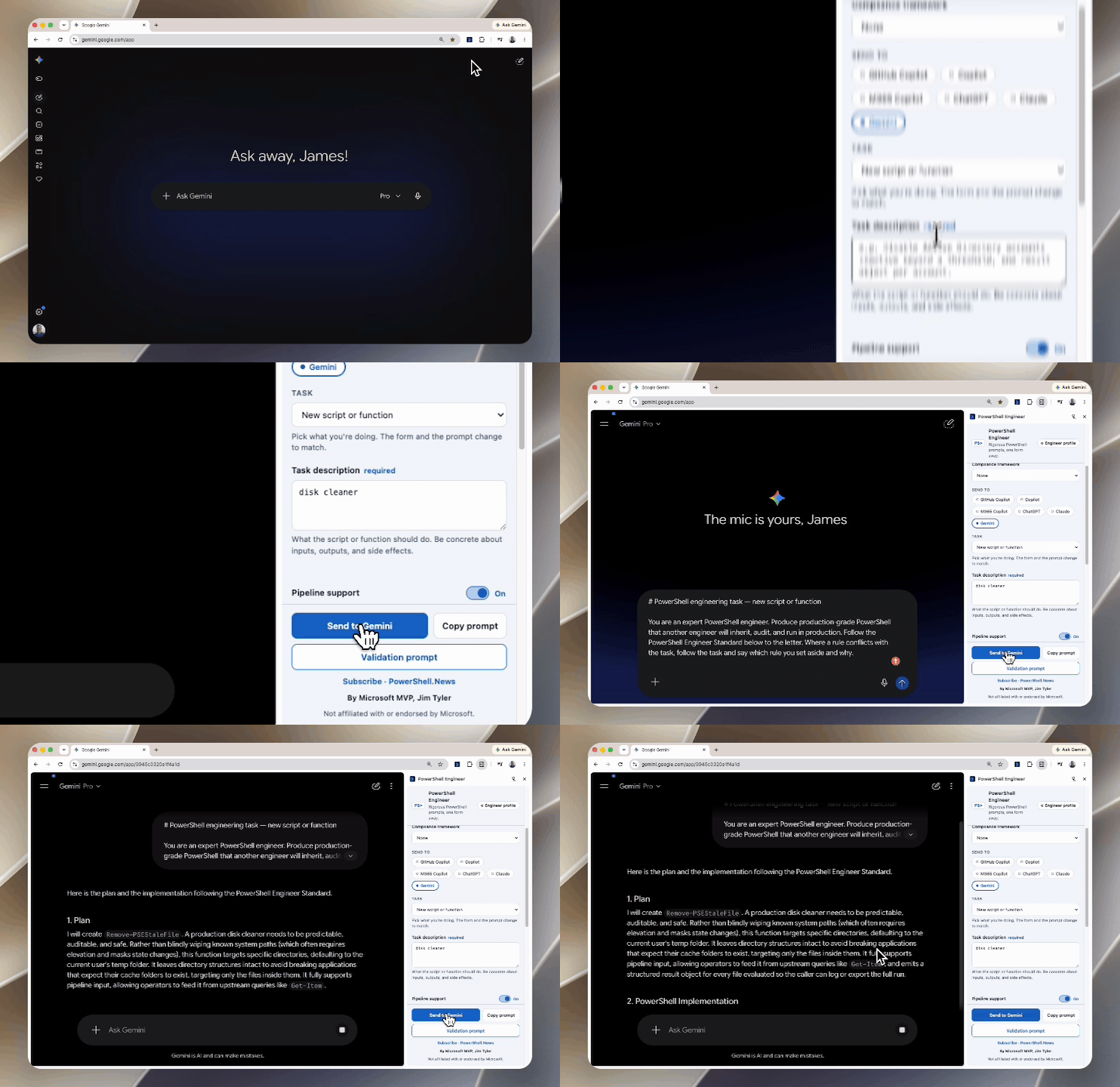
The word “relevant” is doing work in that paragraph, and it’s a correction I had to make early. You should almost never inject the whole Standard. Twelve thousand tokens of rules for a request that needed four of them is waste, and worse, it buries the sections that mattered under the ones that didn’t. So the assembler picks a baseline plus whatever the task and your workspace imply. Mention a PowerShell 5.1 target and the cross-platform section comes along quietly, because that’s where the ternary operator and ForEach-Object -Parallel warnings live.
The Firefox version is published and works the same way. The Edge version is built and sitting in review, which is its own kind of character-building experience.
The custom GPT, back from the dead
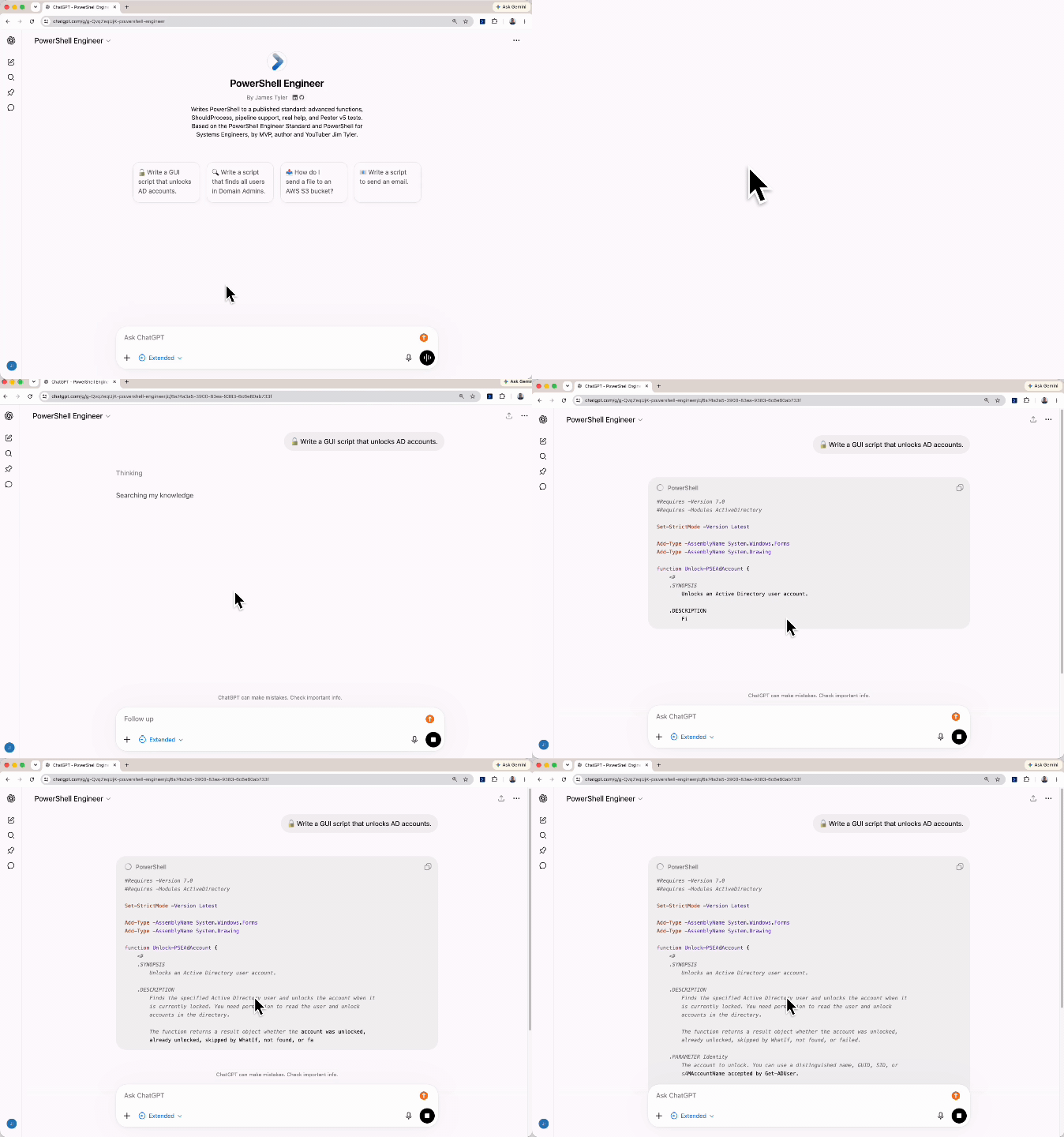
I built a custom GPT years ago, back when custom GPTs were the new thing. It was trained on my book, PowerShell for Systems Engineers, and it was reasonably good at what the book covered.
Then I stopped touching it, the way you do.
It’s now been rebuilt on the PowerShell Engineer Standard. Same place, same link, entirely different behavior. It still has the book’s material underneath, which turns out to matter, because the book explains why the practices exist and the Standard only tells you what they are. The combination answers better than either does alone.
If you already live in ChatGPT and don’t want another extension, this is your path in.
VS Code, and Open VSX
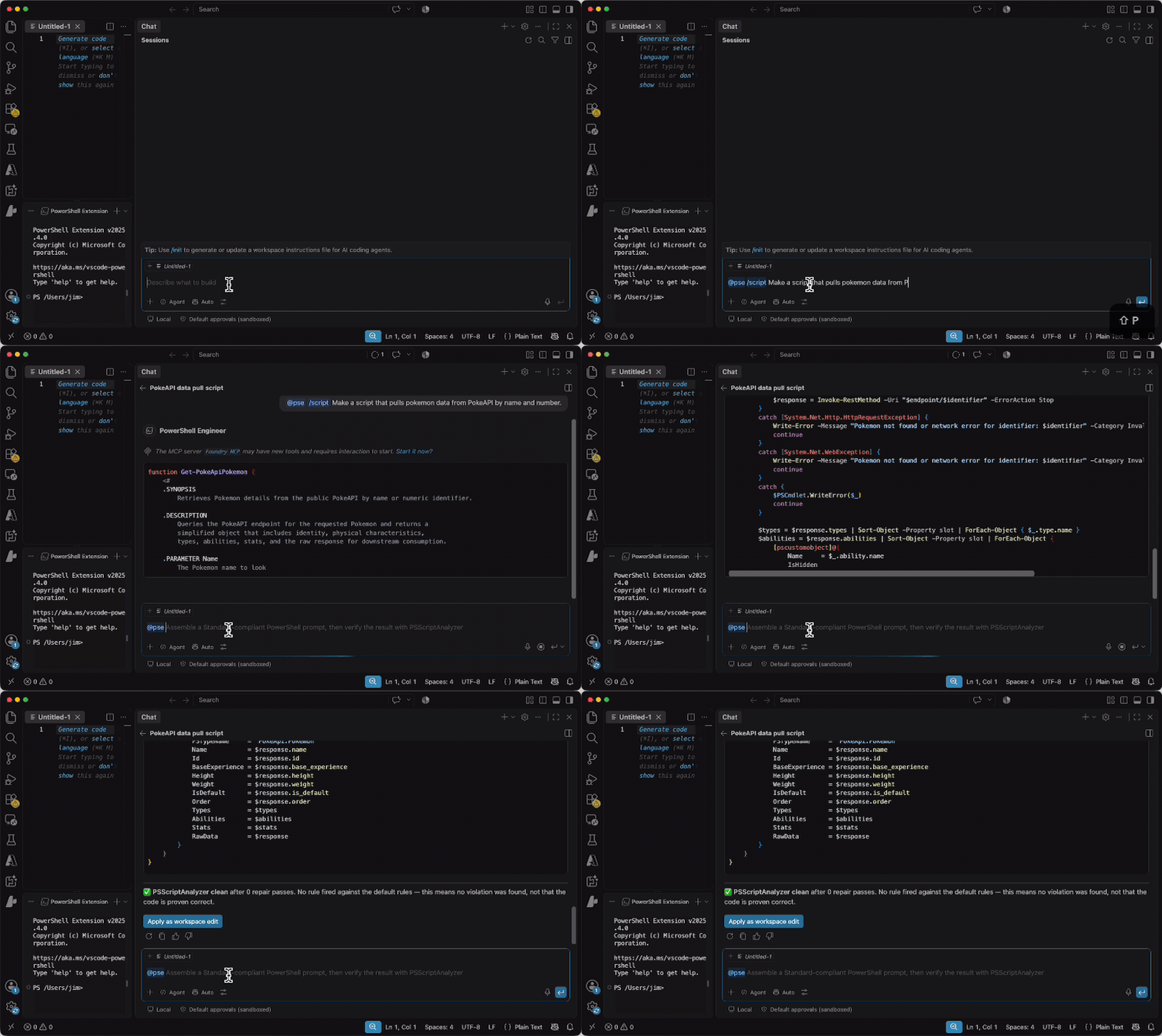
The VS Code extension is where the loop actually closes, and it’s the one I’d point a working engineer at after AGENTS.md.
It’s published on both the Visual Studio Marketplace and Open VSX, so it works in VS Code, VSCodium, Cursor, Windsurf, and anything else building on the open registry.
Two ways to use it. The first is @pse in Copilot Chat, which is the conversational path: ask, get an answer built against the Standard. The second is the one that matters more. The extension registers its tools globally, so Copilot’s agent mode can call them on its own, without you remembering to ask. The agent decides it’s writing PowerShell, reaches for the Standard, and applies it.
The advantage this has over the browser extension is context it can actually read. It sees your module manifest. It sees the function names that already exist in your project. So it knows your prefix without being told, it knows which of your own commands it can call, and it stops inventing a helper function you never wrote.
The PSScriptAnalyzer piece, and what it doesn’t mean
The extension runs PSScriptAnalyzer against the Standard’s settings file, inline, as you work. That part’s straightforward.
What I keep having to say out loud is what happens when it comes back clean.
No rule fired. That is a floor, not proof of correctness.
That exact framing is in the VS Code output, in the MCP server’s response, in the GitHub Action’s job summary, and, deliberately, in the tool description that Copilot’s agent mode reads before it decides how much to trust the result. If a tool doesn’t tell a model what its output doesn’t mean, the model will happily overclaim on its behalf. A clean analyzer run says no rule matched. It says nothing at all about whether Get-ADUser -IncludeDisabled exists.
There’s a matching rule about execution, and it lives in a separate file so the distinction can’t erode by accident. Static analysis parses without running anything, so it runs automatically. Pester executes the code under test, so it never runs unless you say yes, per invocation, every time.
PSEng, built on Phi
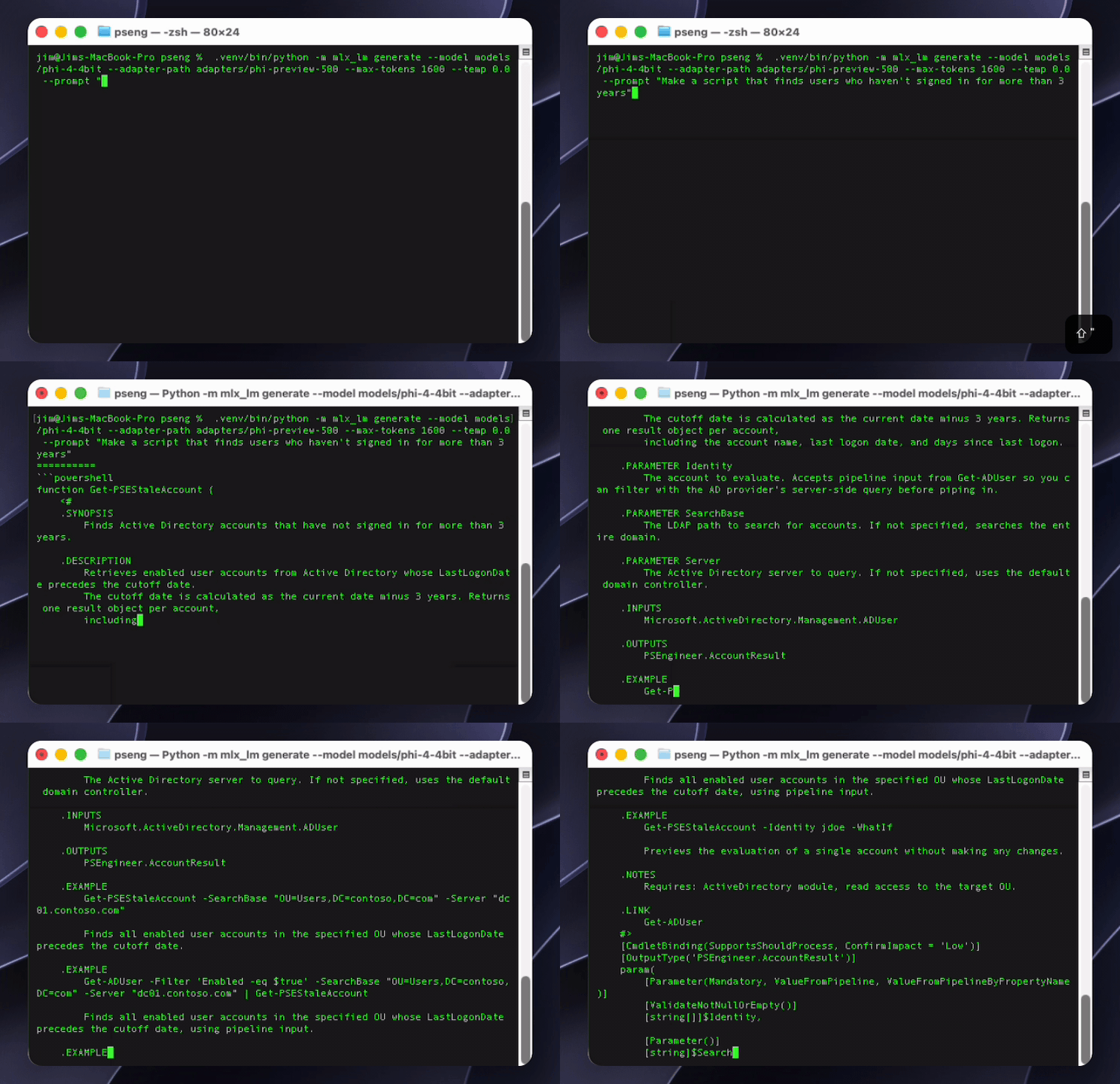
If the Standard costs twelve thousand tokens to carry in context, the obvious question is whether a model can just learn it instead.
Why Phi
Phi is Microsoft Research’s family of small language models, and the thesis behind it is the reason it’s the right base for this.
The original Phi paper was titled Textbooks Are All You Need. The argument was that data quality beats data quantity by a wider margin than anyone expected, and that a small model trained on carefully curated, textbook-grade material can hold its own against models many times its size. Phi-4 is the 14-billion-parameter result of running that thesis for several generations, and Microsoft released it under the MIT license, weights and all.
Which means: a Microsoft-built small model, trained on the premise that a good textbook beats a big pile of scraped text, released under a license that lets you fine-tune it, and pointed at a standard for writing Microsoft’s own shell language. Small enough to train on hardware you already own. Every piece of that lined up.
What comes out the other side
The first version was trained on a different open-weight base, before Phi. The method is the same either way. The training set is PowerShell that scores 100/100 against a frozen rubric, generated and scored entirely on a laptop, with no hosted API anywhere in the pipeline.
The useful way to describe the result isn’t a score. It’s what changes in the code.
Ask a general purpose assistant for an account-cleanup function and you tend to get output with a specific set of holes. It reports progress with Write-Host, so nothing it tells you can be captured, piped, or exported. You get a screen of green text and no audit trail. It calls the mutating cmdlet without -ErrorAction Stop inside its try, so a non-terminating failure sails past the catch and it prints a success message for an account it didn’t actually disable. It catches errors generically, flattens them to a string, and throws away the error record. It emits nothing at all, so you can’t pipe the results into Export-Csv to hand your auditor.
Every one of those is something I’ve watched a frontier model do this month.
The tuned model produces the other shape by default: SupportsShouldProcess with ConfirmImpact set, a typed catch on the specific exception the AD module actually throws, Get-ADUser splatted rather than run off the edge of the screen, and one [pscustomobject] per account evaluated rather than per account changed, so a -WhatIf run is a report you can file.
That last detail is the one I’d point at. Nobody asked for it. It’s an engineering judgment about what the person running this at 2am will need afterwards, and it’s in the Standard because that’s the kind of thing a standard is for.
What it does not fix is the invented parameter. That’s still where nearly all of its remaining errors live, and it’s the honest limit of this approach. Fine-tuning is good at teaching behaviour and bad at storing facts. A model trained on Get-Help dumps absorbs the general shape of parameter names and produces fluent, plausible, wrong code. So the surface information is used as a filter instead. Every candidate is checked against real installed modules before it can enter the training set, and anything invented is thrown out rather than learned.
Conformance is solved. Hallucination isn’t, and I’d rather say that than let you find out yourself.
The part your security team cares about
Here’s where a local model stops being a technical curiosity.
Look at what’s actually in the script you’d paste into a chat window. Server names. OU distinguished names. Service account names. Your naming conventions, your network topology, which security groups gate what. A stale-account cleanup script is a small map of how your directory is organised, and the error message you paste back to ask “why doesn’t this work?” is usually more revealing than the script was.
That’s not a hypothetical objection. It’s the reason the answer is no.
PSEng runs on the machine in front of you. Not “encrypted in transit.” Not “we don’t train on your data.” Nothing is transmitted, because there is nothing to transmit. No API key, no account, no network call, no vendor.
What that buys, concretely:
It works air-gapped. Isolated networks, classified environments, OT and manufacturing segments, anywhere with no route to the internet by design. Most AI tooling can’t be deployed there at all. This can.
Procurement has nothing to review. No data-processing agreement, no sub-processor list, no retention policy, no data-residency question. The review that normally takes a quarter doesn’t apply to software that never phones home.
It doesn’t have outages. When a provider goes down, and they do, your scripting assistant is still sitting on your laptop.
The cost doesn’t scale with use. No per-token billing, no seat count, no awkward invoice conversation when the team starts using it properly.
There’s a second, quieter benefit that only shows up once you’re using it. A model that knows the Standard doesn’t need to be told the Standard, which means the entire context window is available for your code. Twelve thousand tokens of rules is most of a small model’s working memory. Hand the prompted version a 500 line script to refactor and it doesn’t fit. Hand it to this one and it does.
The trade is real and worth stating plainly. A small local model is not as generally capable as a frontier model. It writes PowerShell to a standard. It won’t help you with your Terraform.
But for the specific job of “write me a function that follows our rules and doesn’t invent cmdlets,” the gap is much narrower than you’d expect. And in a regulated environment, the model you’re actually allowed to use beats the one you aren’t.
Get it
The preview is up on Hugging Face: huggingface.co/jimtyler/pseng-14b-preview
It’s a LoRA adapter, about 213 MB, MIT licensed. The model card has the exact commands, including the one that builds the quantized Phi-4 base it expects.
It runs on Apple Silicon only. The training and the runtime both use MLX, Apple’s array framework, so a Mac with an M-series chip is the requirement. I am working on one good enough for Windows, but I am working with the hardware I have, and it’s worth being blunt about rather than letting you find out after the download. The reason is prosaic: MLX is what made training a 14 billion parameter model on a laptop practical in the first place, and the laptop I had was a Mac. A GGUF build would open this up to Windows through Ollama or LM Studio, and it’s on the list.
Call it what it is: a preview. It was trained on 517 examples, stopped early on a noisy validation curve, and it has not yet been scored against the frozen benchmark. It still invents a parameter now and then, which is the whole reason section 0.1 exists and the reason you check anything you don’t recognize before you run it. I’ve got work to do!
What’s on the horizon
Several of these are built and queued rather than theoretical, and I’ve kept them out of this article mostly for space.
An MCP server, so any MCP-speaking client carries the Standard without an extension. A GitHub Copilot extension and an M365 Copilot agent, each shaped for the context its host expects. A Claude Skill. A GitHub Action at the other end of the loop, running PSScriptAnalyzer against the Standard’s settings and annotating your pull requests. Actually, a lot of these things are done and maybe not published.
One rule holds all of it together, and it’s the reason adding channels doesn’t multiply the maintenance: a single core/ package owns the assembler, the Standard payload, the file templates, and the verification engine. Every channel derives from it, and the test suite fails if any of them drift.
Then there are the deep dives. Every section of the Standard gets its own article, starting with the thirteen non-negotiables above, because a checklist tells you what and I’d rather you knew why.
And in the meantime, if you hit a cmdlet or a parameter you don’t recognize in generated code, whoever generated it, check it before you run it. That habit is worth more than every tool on this list. Let’s go, fellow PowerShell Engineers!
The PowerShell Engineer Standard is MIT-licensed and lives at powershellengineer.com/standard. Not affiliated with or endorsed by Microsoft. PowerShell is a trademark of Microsoft Corporation.